Inbound Call Status Callbacks
Inbound Call status callbacks are enabled at the phone number level and focus specifically on tracking inbound calls to that number. By default, your webhook is only called when the call is either completed or if it fails. This would be best suited for tracking the inbound calls in a call center to keep track of success rate, call quality, total calls, etc.
Inbound Call Status Change Callback Parameters
The following parameters will be posted via an HTTP request to your webhook - you can use one or all of them depending on what type of information you are looking for.
| Parameter Name | Parameter Description | Parameter Type |
|---|---|---|
CallSid | A unique identifier for the call. May be used to later retrieve this message from the REST API. | String |
AccountSid | The unique ID of the project this call is associated with. | String |
From | The From number in E.164 format. | String |
To | The To number in E.164 format. | String |
Timestamp | The timestamp of the call creation date/time. | String |
CallStatus | The status of the call. In this case it will either be failed or completed. | String |
CallDuration | The duration, in seconds, of the call. | String |
AudioInMos | The score that represents the quality of the call (1-5). | String |
How to Set Inbound Call Status Callbacks
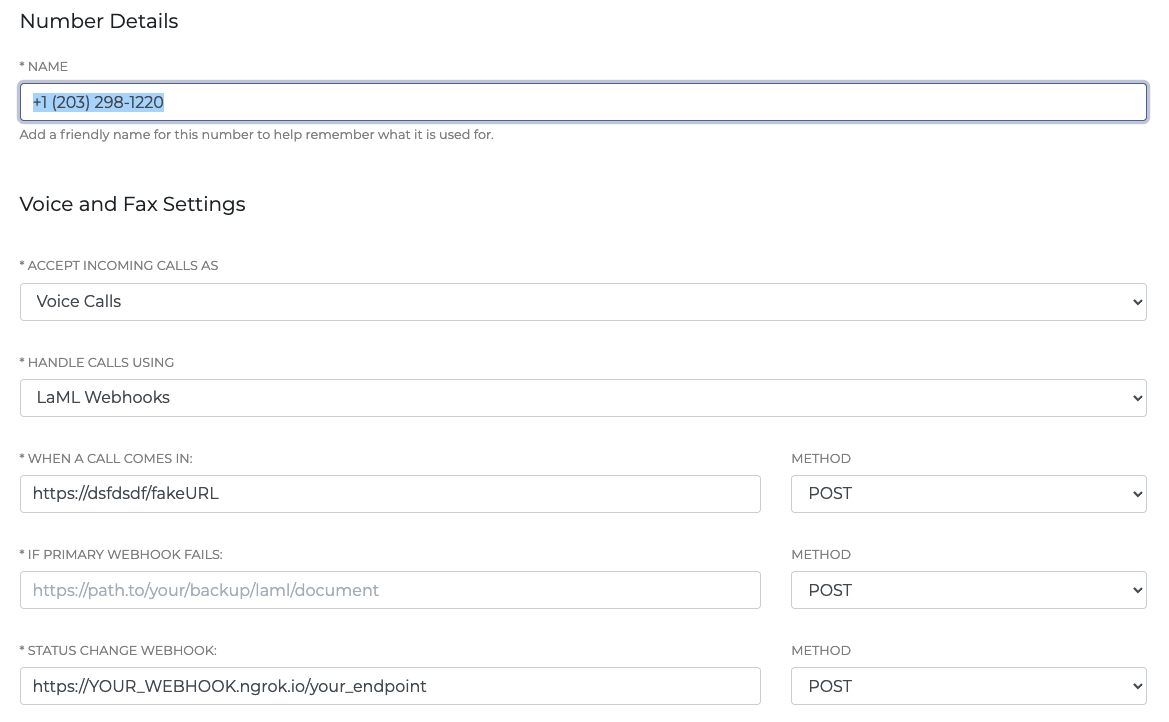
To set an inbound call status callback, navigate to the Phone Numbers tab within your SignalWire Space on the lefthand sidebar. You can then click a specific phone number for which you want this feature enabled and click into Phone Number Settings. Set Status Change Webhook to your webhook and save. All future inbound calls will now result in an HTTP request to your webhook.
Inbound Call Status Callback Application Example
Below is an example of a simple inbound call tracker that will log every incoming HTTP request (when any inbound call is completed or failed). We will add it to a table of call records and print this out each time so anyone viewing can watch the current progress. We will also perform some calculations to keep an eye on the total number of calls, total call duration in minutes, and the average audio quality of all the calls. When the app is exited, we will export the full log to CSV for easier review and storage of daily records. Below you can see what is logged to the console each time a new call comes in.

from flask import Flask, request
import numpy as np
import pandas as pd
from signalwire.rest import Client as signalwire_client
import atexit

# instantiate flask app and signalwire client
app = Flask(__name__)

client = signalwire_client("ProjectID", "AuthToken",
                           signalwire_space_url='YOURSPACE.signalwire.com')
# set up an array to store call records
callArray = []

# define actions to take on exit - export dataframe to CSV and print goodbye message to console
def onExitApp(dataframe):
    dataframe.to_csv('Calls.csv', index=False, encoding='utf-8')
    print("Inbound callback app exited, goodbye!")

# create empty global dataframe and register onExitApp using atexit()
df = pd.DataFrame()
atexit.register(onExitApp, dataframe = df)

# set up our route for incoming call http requests
@app.route("/incomingCalls", methods=['POST'])
def incoming_calls():
    # store incoming request parameters in variables
    call_sid = request.values.get('CallSid')
    call_status = request.values.get('CallStatus')
    event_timestamp = request.values.get('Timestamp')
    to_number = request.values.get('To', None)
    from_number = request.values.get('From', None)
    call_duration = request.values.get('CallDuration', None)
    audio_in_mos = request.values.get('AudioInMos', None)

   # append call data to array
    callArray.append([call_sid, call_status, event_timestamp, to_number, from_number, call_duration, audio_in_mos])

    # create dataframe with headers from call array
    df = pd.DataFrame(callArray, columns=('Call SID', 'Call Status', 'Event Timestamp', 'To Number', 'From Number', 'Call Duration(s)', 'Audio in MOS'))

    # convert all None values to NaN so it can be used in calculations
    # convert duration and audio mos score from strings to int & float
    df = df.fillna(value=np.nan)
    df['Call Duration(s)'] = df['Call Duration(s)'].astype(float)
    df['Audio in MOS'] = df['Audio in MOS'].astype(float)

    # perform some calculations to print up to date live call stats
    totalCalls = len(callArray)
    totalCallDuration = df['Call Duration(s)'].sum(skipna=True)
    totalCallDurationinMinutes = float(totalCallDuration / 60)
    roundedMinutes = round(totalCallDurationinMinutes, 2)
    avgAudioMOS = df['Audio in MOS'].mean(skipna=True)

    print("Current Inbound Call Stats: ")
    print('----------------------------')
    print('Total # of Calls: ' + str(totalCalls))
    print("Call Duration in Minutes: " + str(roundedMinutes))
    print('Average Audio Quality (measured in MOS): ' + str(avgAudioMOS))
    print(df.to_string())

    return ('', 200)

if __name__ == "__main__":
    app.run()