SMS Status Callbacks
One of the most popularly used forms of status callbacks is the SMS status callback. As messaging can often be high volume, it's crucial to be able to keep track of how your messaging campaigns are performing and handle any errors that start to pop up.
SMS status callbacks will allow SignalWire to make an HTTP request to your specified callback URL with the message status and error code (if present). Your app can use these parameters to keep track of delivery status, calculate the delivery rate, monitor throughput, monitor for emerging errors, and much more.
SMS Status Callback Parameter
The following parameters will be posted via an HTTP request to your webhook - you can use one or all of them depending on what type of information you are looking for.
| Parameter Name | Parameter Description | Parameter Type |
|---|---|---|
MessageStatus | The current status of the message at the time of the callback. | string |
ErrorCode | If your message has failed or is undelivered, the error code may provide you with more information about what went wrong. | string |
MessageSid | The unique ID of this message. | string |
AccountSid | The unique ID of the project this message is associated with. | string |
From | The 'From' number of the message | string |
To | The 'To' number of the message | string |
Body | The body of the message | string |
NumMedia | The number of media files that were included with the message | integer |
NumSegments | The number of segments that make up the entire message. If the body of the message is larger than 160 GSM-7 characters or 70 UCS-2 characters, it will automatically be broken up into smaller messages and annotated to attempt proper reconstruction on the recipient handset. Read more about this here. | integer |
How to Set SMS Status Callbacks
You can set up SMS status callbacks in your API request for an outgoing message by using the StatusCallback parameter.
There are 8 possible SMS statuses that are expanded upon below.
| Message Status | Description of Status |
|---|---|
| queued | The API request to send this message was processed successfully, and the message is currently waiting to be sent out. Read more about our queuing system here. |
| sending | The message is currently being transmitted by SignalWire to the nearest carrier upstream in the network. |
| sent | The nearest carrier upstream in the network has accepted the message. |
| delivered | Confirmation of receipt of the message by the nearest carrier upstream in the network. |
| undelivered | SignalWire has received notice from the nearest carrier upstream in the network that the message was not delivered. |
| failed | SignalWire could not send the message. There is no charge for failed messages. |
| receiving | SignalWire has received and is currently processing an inbound message. |
| received | The message has been received by one of the numbers in your account. Applies to inbound messages only. |
SignalWire can't and won't show a message as Delivered unless we can 100% confirm delivery to the end network by getting a Delivery Receipt (DLR) from the receiving carrier. A status of Sent means that the message left SignalWire successfully and reached our downstream peer. Once we receive the Delivery Receipt indicating that the message entered the end carrier's network, it switches to Delivered.
If you see a message with a status of Delivered that did not reach the end handset, feel free to open a support ticket with the message SID for us to escalate the example to our carrier partners to find out why the MNOs (Verizon, AT&T, T-Mobile, etc) marked it as Delivered.
Some carriers may send delayed DLRs, and others may not send DLRs at all. Providers do not currently allow for any DLRs for MMS, so you will only ever see the status Sent.
You can also fetch messages individually or delete messages using our retrieve message API endpoint and delete message API endpoint.
SMS Status Callbacks Application Example
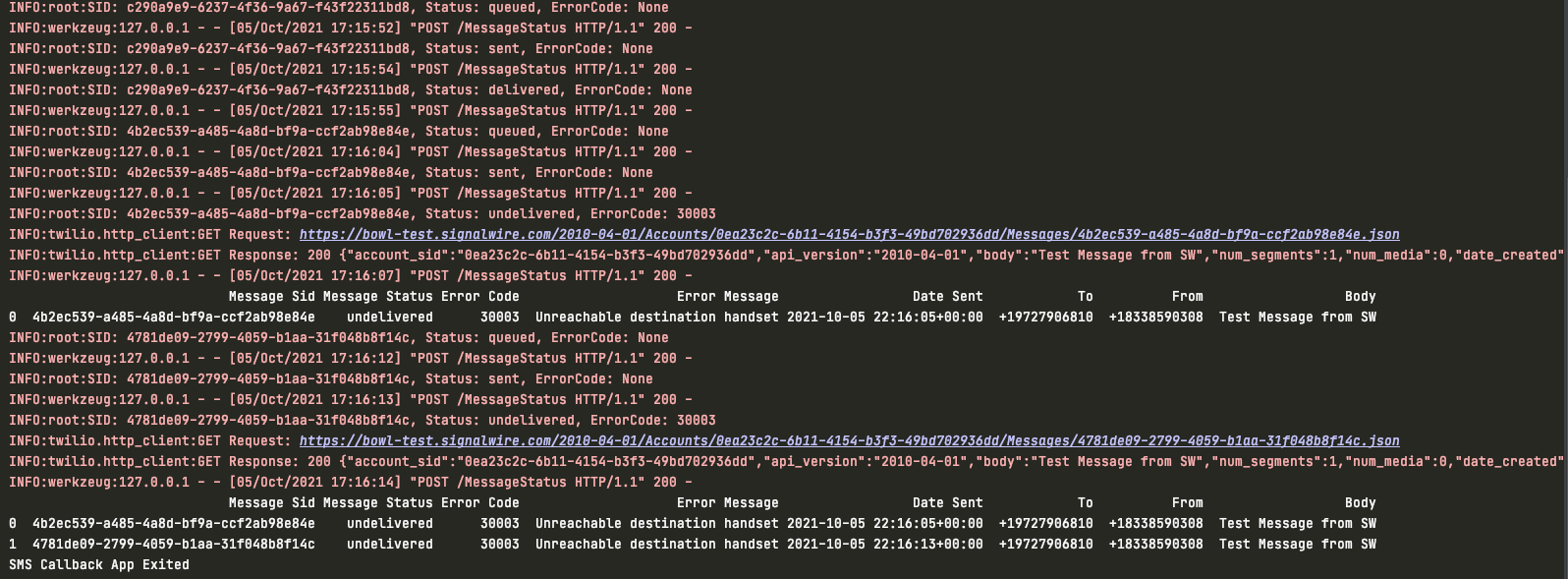
Below is an example of a simple delivery status tracker that could begin running before a message campaign goes out and end when a message campaign ends. While the app is running, it will log the status change event of every single message to the console with the following information: MessageStatus, MessageSid, and ErrorCode. This will happen for every outbound message in the same project that includes this script as the StatusCallback URL.
When a message returns a status of failed or undelivered, it will be added to a table that keeps track of all unsuccessful messages along with their MessageSid, MessageStatus, ErrorCode, ErrorMessage, DateSent, To, From, and Body. After every failed/undelivered message, this table will be printed so the updated list can be seen.
When the messaging campaign is over and the Flask app is closed, the whole table will be exported to CSV so that failed/undelivered messages can be easily investigated.
In the output below, you can see successful messages logged to the console as well as the table being updated when messages fail to deliver for any reason.
from flask import Flask, request
import logging
import pandas as pd
from signalwire.rest import Client as signalwire_client
import atexit

logging.basicConfig(level=logging.INFO)
app = Flask(__name__)

# create an empty array to keep track of all of our undelivered
# or failed messages during the time this app is run
undeliveredArray = []

# define actions to take when flask app is closed
# export dataframe of all failed or undelivered
# messages to CSV with added detail
def onExitApp(dataframe):
    dataframe.to_csv('failedAndUndeliveredMessages.csv', index=False, encoding='utf-8')
    print('SMS Callback App Exited')

# authenticate the SignalWire client
client = signalwire_client("ProjectID",
                           "AuthToken",
                           signalwire_space_url='YOUR_SPACE.signalwire.com')

# define route for SMS status callbacks to be posted to
@app.route("/smsErrorTracker", methods=['POST'])
def newest_message():
  	# get message sid, message status, and error code (if it exists) from callback parameters
    # if they don't exist, set to None
    message_sid = request.values.get('MessageSid', None)
    message_status = request.values.get('MessageStatus', None)
    error_code = request.values.get('ErrorCode', None)

    # log every message that comes in to console
    logging.info('SID: {}, Status: {}, ErrorCode: {}'.format(message_sid, message_status, error_code))

    # if the message is undelivered or failed, use message SID to fetch additional data
    # about the failed message
    if (message_status == "undelivered" or message_status == "failed"):
        message = client.messages(message_sid).fetch()

        # add identifying data from newest message to undelivered array
        undeliveredArray.append([message_sid, message_status, error_code, message.error_message, message.date_sent, message.to, message.from_, message.body])
        # insert array into dataframe with columns for easier reading
        df = pd.DataFrame(undeliveredArray, columns=('Message Sid', 'Message Status', 'Error Code', 'Error Message', 'Date Sent', 'To', 'From', 'Body'))
        # print dataframe to string for nicer formatting and set dataframe to our parameter in function for handling app exit
        print(df.to_string())
        atexit.register(onExitApp, dataframe=df)

		# return 200OK
    return ('', 200)

if __name__ == "__main__":
    app.run()