Voice Status Callbacks
Voice status callbacks allow you to get an advanced view of how your call center is performing in real-time as well as key analytics that can be used to track performance. Callback applications could be as simple as tracking failures or as complex as full-scale real-time monitoring of in-progress calls.
Voice status callbacks will allow SignalWire to make an HTTP request to your specified callback URL with the ForwardedFrom, CallerName, CallDuration, RecordingURL, RecordingSid, RecordingDuration, Timestamp, CallbackSource, AudioInMos, and SequenceNumber. Your app can use these parameters to keep track of any associated recordings, caller info, average times of calls, or simply monitoring for failures.
Voice Status Callback Parameter
The following parameters will be posted via an HTTP request to your webhook - you can use one or all of them depending on what type of information you are looking for.
| Parameter Name | Parameter Description | Parameter Type |
|---|---|---|
AccountSid | The unique ID of the project this call is associated with. | string |
ApiVersion | The version of the SignalWire API. Incoming calls use the API version placed on the number called. Outgoing calls use the version of the REST API request. | string |
AudioInAveragePtime | The average time between packets for the inbound stream. | integer |
AudioInDtmfPacketCount | The amount of dtmf packets in the inbound media stream. | integer |
AudioInFlushPacketCount | This variable counts the number of incoming packets that were removed from the jitter buffer due to buffer overflow or underflow, causing these packets to be discarded or lost. | integer |
AudioInJitterMaxVariance | This represents the maximum variance of jitter for incoming audio RTP packets. | integer |
AudioInJitterMinVariance | This represents the minimum variance of jitter for incoming audio RTP packets. | integer |
AudioInLargestJbSize | This indicates the largest size of the jitter buffer recorded for incoming audio RTP packets during the session. | integer |
AudioInMos | A mean opinion score on a scale of 1-5 that helps determine audio quality. | string |
AudioInMediaPacketCount | The number of audio packets received in the inbound media stream. | integer |
AudioInSkipPacketCount | Increased with every packet not received at a given ptime. Increases with every lost packet from the inbound stream. | integer |
AudioOutDtmfPacketCount | The total number of DTMF packets generated in the outbound media stream. | integer |
AudioOutMediaPacketCount | The number of audio packets sent in the outbound media stream. | integer |
CallbackSource | The source of the status callback | string |
CallDuration | The duration, in seconds, of the finished call. Only present on the completed event. | integer |
CallerName | The name of the caller. Only available if Caller ID lookup is enabled. | string |
CallSid | A unique identifier for the call. | string |
CallStatus | The status of the call. Can be one of the following values: ringing, in-progress, queued, failed, busy, no-answer, or completed. | string |
Direction | An identifier to describe the direction of the call: outbound-dial: calls launched through the verb outbound-api: calls launched through the REST API inbound: for inbound calls | string |
ForwardedFrom | The number this call was forwarded from. | string |
From | The phone number that sent this call, in E.164 format. | string |
ParentCallSid | A unique identifier for the call that created this call. | string |
RecordingDuration | The duration, in seconds, of the recording | integer |
RecordingSid | The unique identifier for the audio recording | string |
RecordingUrl | The URL of the recorded audio call | string |
SequenceNumber | The order in which events occur. Starts at 0. Although events are fired in order, they each take time and may not appear in the order you expect. | integer |
SipInviteResultPhrase | A textual description of the result of the SIP INVITE request, indicating success or failure with additional details. | string |
SipResultCode | The numeric SIP response code received for the INVITE request, indicating the outcome of the call attempt. Learn more about the possible SIP response codes. | string |
Timestamp | The timestamp, in RFC 2822 format, of when the event occurred. | string |
To | The phone number of the call recipient, in E.164 format. | string |
How to Set Voice Status Callbacks
You can use the StatusCallback while creating a call via the API or using Dial with Number, SIP, or Conference to get notifications with these parameters when the call is completed.
Alternatively, you can get every call progress event posted to your StatusCallbackURL parameter along with information about the call state as well as several helpful request parameters by using StatusCallbackEvent.
Once a call is created, it progresses through multiple states until it is finally completed. There are 8 possible call statuses that are expanded upon below:
| Call Status | Status Description |
|---|---|
ringing | The call is ringing |
in-progress | The call was answered and is in progress. |
queued | The call is ready and in line to initiate. |
failed | The call could not be completed. Usually occurs when phone number does not exist. |
busy | The caller encountered a busy signal. |
no-answer | The call ended without an answer. |
completed | The call was answered and ended normally. |
canceled | The REST API canceled the call while it was ringing or queued. |
You can also fetch messages individually or delete calls using our retrieve call API endpoint and delete call API endpoint.
Voice Status Callbacks Application Example
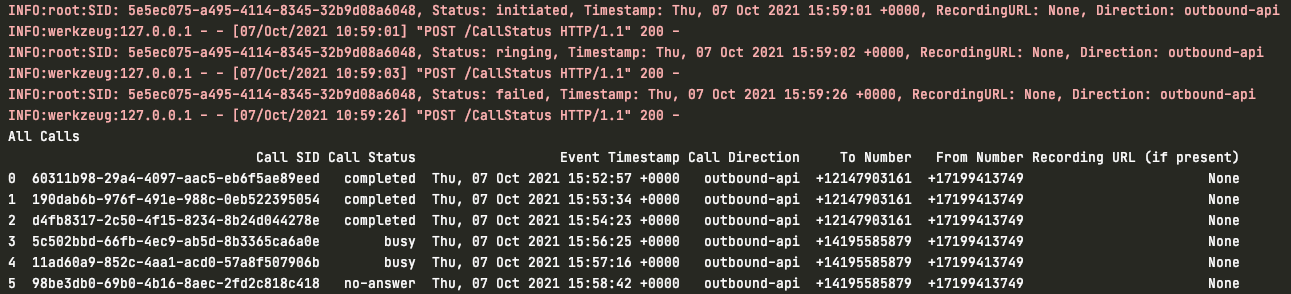
Below is an example of a simple call status tracker that will log every status change event ('initiated' to 'ringing', 'ringing' to 'answered', etc) to the console along with the CallSID, CallStatus, Timestamp, and Direction. If a call has reached an end-stage state, i.e. completed, canceled, no-answer, or busy`, it will be added to our table of call records. This table will exclude failed calls and in-progress calls so as to not have duplicate records.
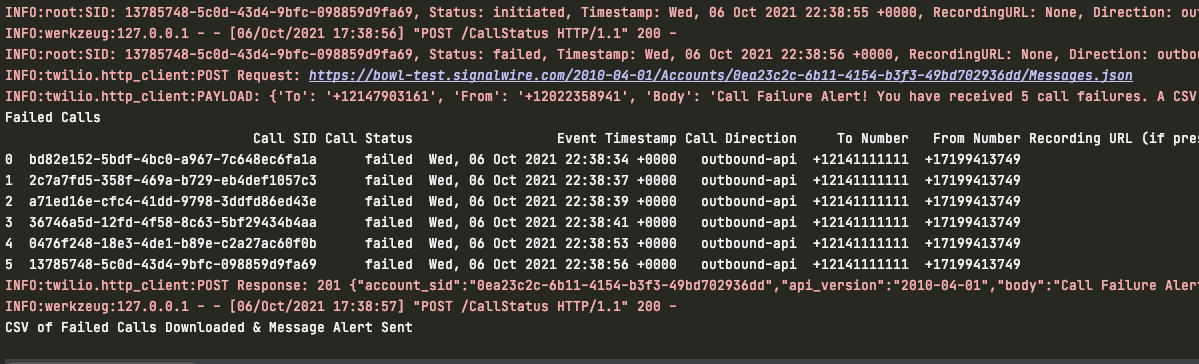
If a call fails, it will be added to a separate table containing failed calls along with relevant data to investigate later. If at any point the number of failed calls in the table reaches 100, the table will be downloaded to CSV and an SMS alert will be sent out to notify whoever would be in charge of dealing with the failures. After the CSV has been downloaded and the alert has been sent, we will clear the failed calls array so it can begin appending new failed calls again.
After every call is appended to either of the tables, the tables will reprint so that it's easy to see the updated list of completed and failed calls. Below you can see the status alerts printed out for each call in red and the table that contains all of the completed calls along with relevant data.
For the example's sake, the script was changed to alert of call failures at 5 calls instead of 100. However, you can see below the table of 5 failed calls and console log statement confirming that the CSV was downloaded and the SMS alert was sent.
from flask import Flask, request
import logging
import pandas as pd
from signalwire.rest import Client as signalwire_client

logging.basicConfig(level=logging.INFO)
app = Flask(__name__)

# create empty arrays to store our call records - one for failed only and one to handle all other end stage statuses (not queued, not ringing, not answered, etc)
failedCallArray = []
allCallArray = []

# authenticate the SignalWire client
client = signalwire_client("ProjectID",
                           "AuthToken",
                           signalwire_space_url='example-space.signalwire.com')


@app.route("/CallStatus", methods=['POST'])
def incoming_calls():
    # grab incoming parameters posted to webhook and assign them variables
    call_sid = request.values.get('CallSid', None)
    call_status = request.values.get('CallStatus', None)
    event_timestamp = request.values.get('Timestamp', None)
    recording_url = request.values.get('RecordingUrl', None)
    call_direction = request.values.get('Direction', None)
    to_number = request.values.get('To', None)
    from_number = request.values.get('From', None)

    # log some basic information to print to console for EVERY status change
    logging.info('SID: {}, Status: {}, Timestamp: {}, Direction: {}'.format(call_sid, call_status, event_timestamp, call_direction))

    # create a separate array for all end stage statuse updates and add them to our call log table, display updated table
    if (call_status != 'ringing' and call_status != 'initiated' and call_status != 'answered' and call_status != 'in-progress' and call_status != 'queued' and call_status != 'failed'):
        allCallArray.append([call_sid, call_status, event_timestamp, call_direction, to_number, from_number, recording_url])
        adf = pd.DataFrame(allCallArray, columns=('Call SID', 'Call Status', 'Event Timestamp', 'Call Direction', 'To Number', 'From Number',
        'Recording URL (if present)'))
        print("All Calls")
        print(adf.to_string())

    # if call status is failed, log call record to call failure table and display table
    if (call_status == "failed"):
        failedCallArray.append([call_sid, call_status, event_timestamp, call_direction, to_number, from_number, recording_url])
        df = pd.DataFrame(failedCallArray, columns=('Call SID', 'Call Status', 'Event Timestamp', 'Call Direction', 'To Number', 'From Number', 'Recording URL (if present)'))
        print("Failed Calls")
        print(df.to_string())

        # if the number of failed calls is over 100
        if len(failedCallArray) > 100:
            # download call logs with necessary data to CSV and send an sms alert of the failures
            df.to_csv('failedCallReport.csv', index=False, encoding='utf-8')
            m = client.messages.create(
                body='Call Failure Alert! You have received 100 call failures. '
                     'A CSV of the failures has been downloaded and the failure database will now reset.',
                from_='+1xxxxxxxxxx',
                to='+1xxxxxxxxxx')
            print("CSV of Failed Calls Downloaded & Message Alert Sent")

            # clear array to start adding fresh logs again
            while len(failedCallArray) > 0:
                failedCallArray.pop()

    # Return 200 OK
    return ('', 200)

if __name__ == "__main__":
    app.run()